SkyrimNet VR Hotkey & Gesture Setup Guide
A recommended configuration for VR users (SkyrimNet MCM Hotkeys + VRIK Gestures)
Overview
SkyrimNet provides multiple ways to trigger AI interactions in VR. The recommended workflow for VR users is:
- Assign hotkeys directly in the SkyrimNet MCM first.
- If you run out of available controller buttons, use VRIK gestures as additional inputs.
To make this flexible and conflict-free, VR players may optionally use a hotkey management mod to free up buttons:
Hotkeys System SE/AE (Nexus 68164)
This mod helps:
- clear default Skyrim VR button actions
- reassign vanilla functions elsewhere
- free physical buttons for SkyrimNet hotkeys
— Configure Buttons Using SkyrimNet MCM Hotkeys
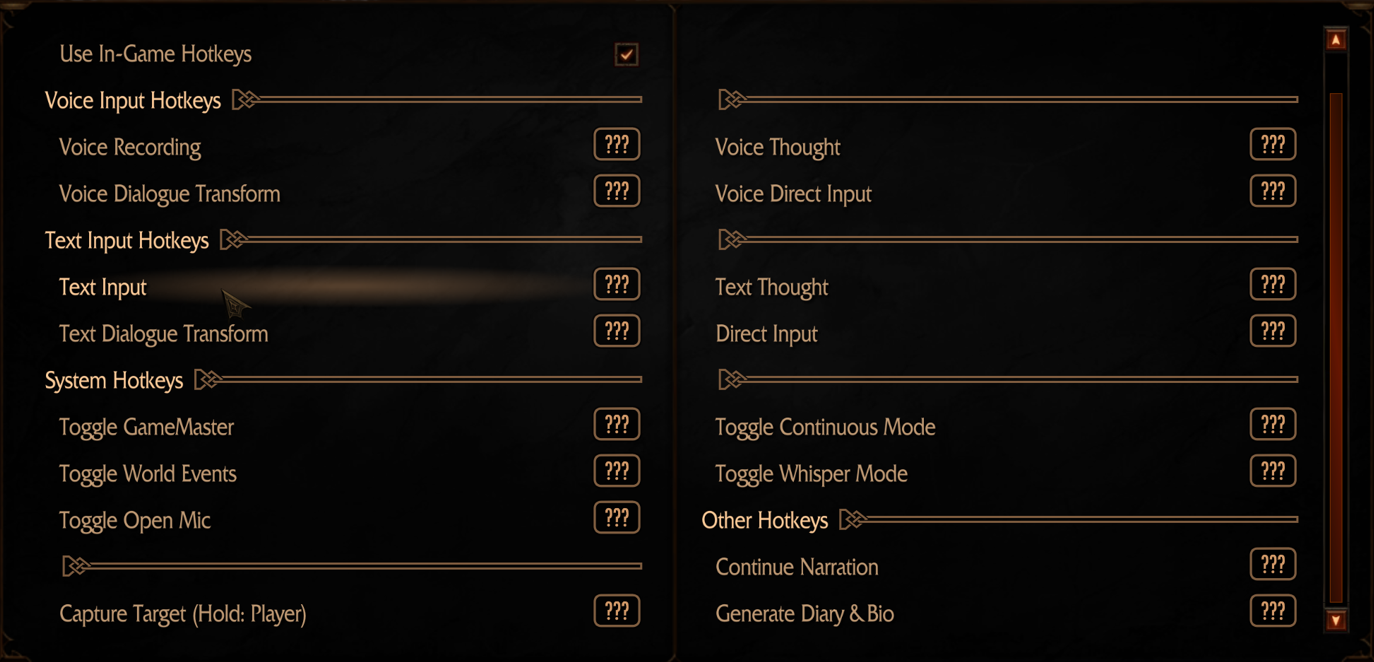
The SkyrimNet MCM includes a comprehensive Hotkeys page. Assign your preferred controller buttons here first.
Available SkyrimNet Hotkey Categories:
Important
A controller button assigned to SkyrimNet must not be performing another Skyrim VR action, or the game and the mod will conflict.
— Use VRIK Gestures When Buttons Run Out
If all controller buttons are already used or you prefer hands-free interaction, configure VRIK gestures for SkyrimNet actions.
To configure:
- Open VRIK MCM → Gesture Config
- Set Gesture Action = Mod Action
- Choose which SkyrimNet action each gesture triggers